Your lid is the
ultimate trigger.
Run Apple Shortcuts automatically when you move your lid.
The physical context switcher your workflows deserve.
Effortless Automation
Three simple steps to turn your MacBook lid into a powerful physical switch.
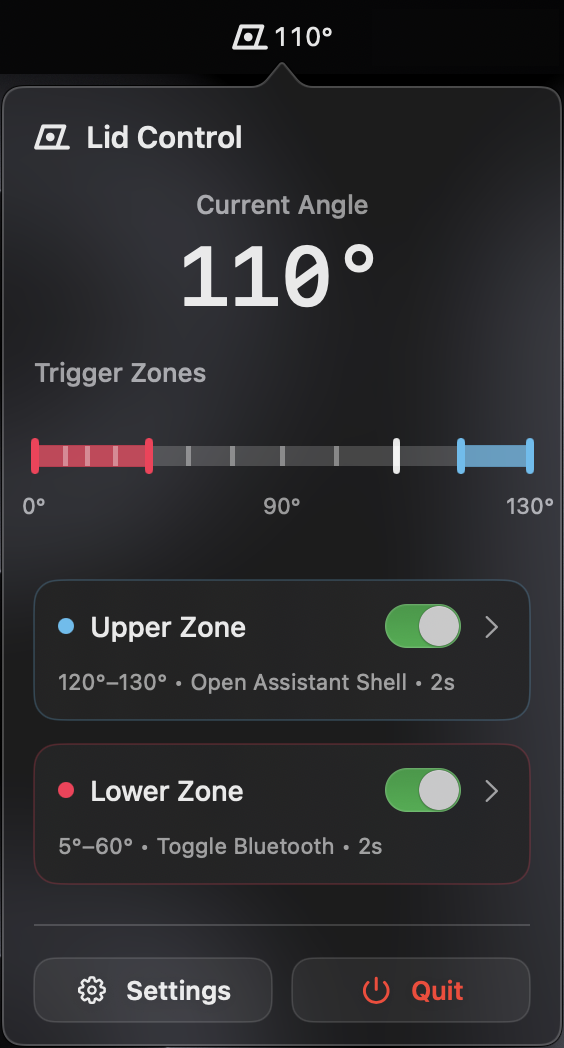
Set Your Triggers
Choose the exact angle for 'Upper' and 'Lower' trigger zones. Customize the dwell time to prevent accidental fires.
Assign Shortcuts
Select any Apple Shortcut from your library. One for upper, one for lower. It's that simple.
Let It Run
LidControl runs quietly in your menu bar. No dock icon, no distractions. Just simple automation.
Built for your daily flows.
Whether you're docking at your desk or stepping away for a coffee, LidControl adapts your Mac to your context.
Desk Setup
Open lid fully to enter 'Work Mode'. Launch IDE, Slack, and set focus.
Meeting Mode
Lower lid slightly to mute audio and enable Do Not Disturb.
Step Away
Lower lid to lock screen and start break timer without sleeping.
Deep Focus
Fully open to close distractions and start a Pomodoro timer.
Coffee Shop
Open lid to connect VPN and set battery-saving brightness.
Night Mode
Lower lid to dim lights (HomeKit) and enable Sleep Focus.
Native Shortcuts
LidControl doesn't run scripts directly. It triggers your Apple Shortcuts, giving you infinite possibilities.
Privacy First
No data leaves your Mac. LidControl is a sandboxed menu bar app that respects your privacy.
Precision Control
Configure exact angles for opening and closing triggers. Add dwell times to prevent accidental fires.